THE NEW INSTREAM · RADIO ENCODER · FREE WITH YOUR PLAN
Transmisor INOVANEX: go on air from your studio computer
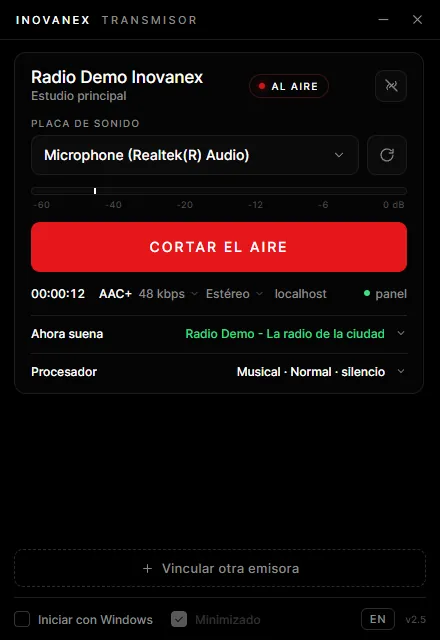
The program that takes the audio from your mixing desk or your computer and sends it to your online station. It links with a code, goes back on air by itself if the computer restarts and has a built-in audio processor. For Windows and Mac, at no cost with every radio streaming plan.
Windows 10 / 11Windows 7 / 8macOS 12+64-bit · Intel and Apple Silicon
30 s
Longest wait between retries if the internet drops
Windows 7–11
64-bit
macOS 12+
Intel and Apple Silicon
AAC+
48 kbps recommended; up to 128
FROM CODE TO AIR
No server, port or password: one code and you are on air
01
Get your radio plan
The Transmisor comes at no cost with every radio streaming plan.
02
Generate the code in your panel
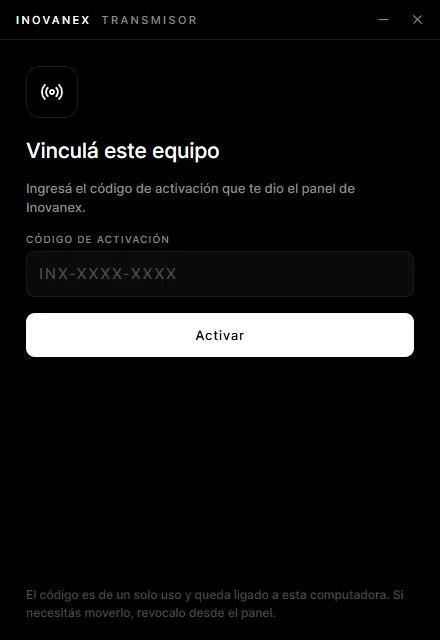
In your station, open "Transmisor para tu PC", generate the linking code and download the installer for Windows or Mac.
03
Install it and paste the code
The Transmisor fetches your station's settings by itself: you don't type any server details.
04
Pick the sound card and go on air
Select the audio input, check the VU meter and press "Go on air". If you want, turn on the processor with your station's preset.
The code is single-use and stays tied to that computer.
BUILT FOR THE STUDIO
Install it once and your station stays on air
01
Links with a code, no passwords to copy
You generate the code in your panel, paste it into the Transmisor and you are done: no server, port or password to type. The code is single-use and stays tied to that computer; if you replace it, you revoke it from the panel.
02
Goes back on air by itself
It starts with Windows or the Mac and resumes the broadcast after a restart. If the internet drops, it keeps retrying until it reconnects, and closing the window keeps it streaming from the tray. It asks for confirmation before going off air.
03
Built-in audio processor
Leveler, 3-band compressor and peak limiter, with presets for music, talk, tropical, rock/pop and classical stations. Your station sounds even, louder and never clips, with no extra hardware to buy.
04
What plays on the computer or the desk
It captures the line input, the mixing desk or the microphone. On Windows it can also capture whatever plays on the computer, so your playout software goes on air as is. On Mac, from macOS 14.2.
05
Automatic "Now playing"
It sends the song that is playing by reading the text file your playout software writes, or a fixed text with your station's name. That way the player and the apps always show something.
06
Several stations on one computer
If you run more than one station, you link them all in the same Transmisor, each with its own sound card and its own on/off air button. Updates install themselves and never while you are on air.
BETA RADIO AUTOMATION INCLUDED
Schedule your station in the same program that broadcasts it
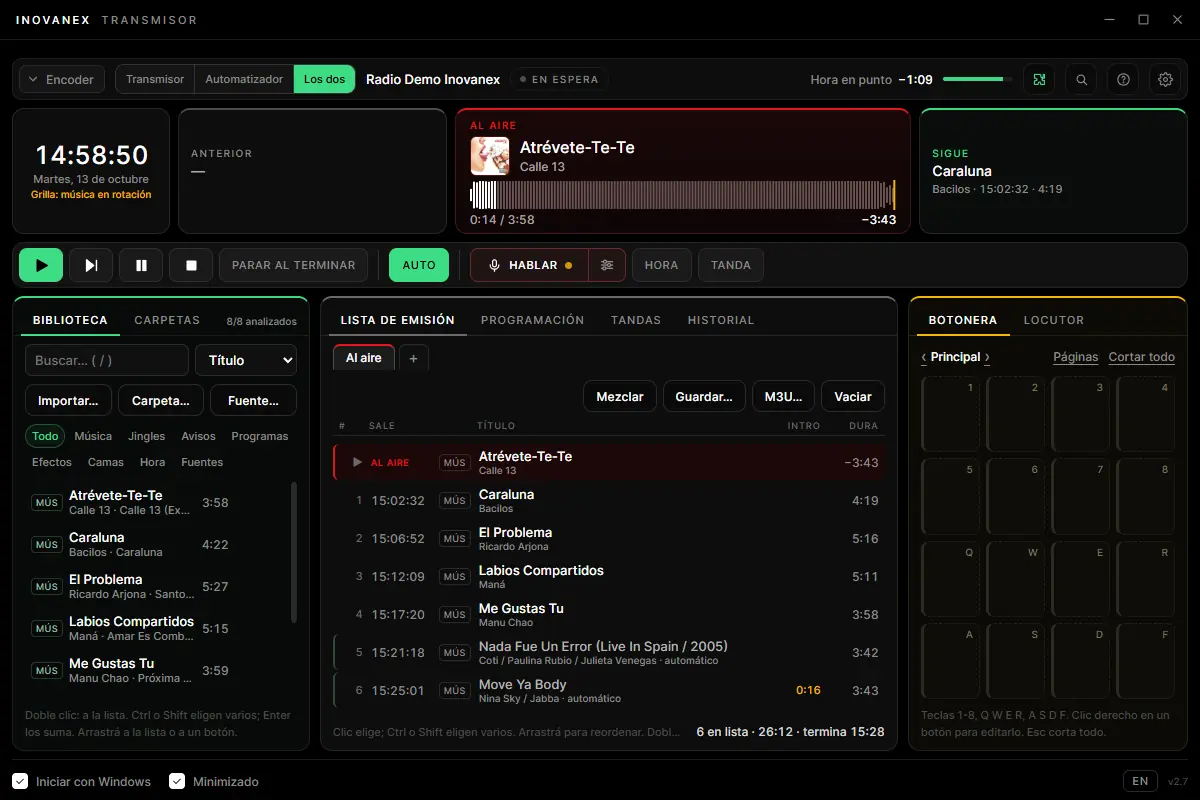
Music, ad breaks, jingles and the time, with the presenter talking over it whenever they want. No other software, no other licence and no extra cost: it comes with your radio streaming plan.
It ships as a beta: a gift for our customers, it may still have rough edges and there are no tutorials yet. Your plan's support covers the streaming; we will help you with the automation, but training on how to use it is not included.
Three ways to use it
Transmitter only
Sends whatever comes into the sound card on air, as always.
Automation only
Builds the programme and sends the audio out of the sound card, to the desk or encoder you already have.
Both
The automation builds the programme and the same computer broadcasts it.
01
A library that analyses itself
Import tracks or whole folders. It reads title, artist, genre and cover, evens out the volume and finds each track's mix point.
02
Playlist with start times
What is going out, in order and with its time. When the operator's list ends, the station carries on by itself: never dead air.
03
Weekly grid and rotation
Seven days by 24 hours, hour clocks and fixed-time events. It won't repeat an artist or a track sooner than you set.
04
Ad breaks with proof of airing
Each spot with its advertiser and its dates, and a PDF proof of airing to hand over. A log of everything aired, with Excel reports.
05
16-button cart wall
Jingles, effects and stingers one click or one key away, with a quick search to fire any audio.
06
Built for the presenter
TALK button, music that ducks by itself, speakers that mute to avoid feedback, spoken time with voices included, stopwatch and rundown.
In Spanish, English and Portuguese. For Windows 10 and 11 and for Mac; on Windows 7 and 8 the Transmisor works as a transmitter only.
BUILT-IN AUDIO PROCESSOR
Your station sounds even, louder and never clips
It comes switched off: turn it on with one click, pick your station's preset and the intensity. Changes apply instantly, without going off air.
01
Low-cut filter
Removes very low-frequency noise (thumps, hum) before processing.
02
Leveler
Evens out what comes in: a quiet track and a loud one come out at the same volume.
03
3-band compressor
Works on lows, mids and highs separately, with bass boost, brightness and stereo width.
04
Peak limiter
Looks ahead at the peaks so the signal never clips.
Presets
Limiter onlyMusicTalkTropicalRock / popClassical / jazz
Intensity
SoftNormalStrong
TECHNICAL SHEET
Systems64-bit Windows 10 and 11 · 64-bit Windows 7 SP1, 8 and 8.1 (separate installer) · macOS 12 or later, Intel and Apple Silicon
Audio inputsSound card, mixing desk, microphone or whatever plays on the computer (on Mac, from macOS 14.2)
FormatAAC: 48 kbps AAC+ v2 recommended, from 32 to 128 kbps · stereo or mono
DeliveryTo your station's server, which delivers it in Icecast and HLS at the same time
LinkingSingle-use code generated in your panel; revoked from the panel
ReconnectionAutomatic, with waits from 1 to 30 seconds; starts with the system
UpdatesAutomatic and signed; never installed while you are on air
LanguagesSpanish, English and Portuguese
PriceAt no cost with every radio streaming plan
Frequent questions
Is Transmisor INOVANEX free?
Yes: it comes at no cost with every radio streaming plan, starting at US$ 12.59 per month (US$ 0.42 per day). It is not sold separately: you activate it with the code you generate in your station's panel.
Which computers does it run on?
On 64-bit Windows 10 and 11; on 64-bit Windows 7 SP1, 8 and 8.1, with a separate installer (Windows 7 needs Microsoft's SHA-2 security updates), and on Mac with macOS 12 or later, Intel or Apple Silicon. It does not run on 32-bit Windows, XP, Vista or Linux.
How do I link it to my station?
In the panel, in your station, open "Transmisor para tu PC" and generate the linking code. Paste it into the Transmisor and it fetches the settings by itself: no server, port or password to type. The code is single-use and stays tied to that computer; to move it to another one, revoke it from the panel and generate a new code.
What happens if the internet drops or the computer restarts?
If the connection drops, the Transmisor retries by itself, waiting a little longer each time and never more than 30 seconds, until it is back on air. If the computer restarts, it starts with the system and resumes the broadcast. And if you change your station's password in the panel, it reconnects within a second.
Can I broadcast whatever plays on the computer?
On Windows, yes: besides the sound card, the mixing desk or the microphone, the Transmisor can capture whatever plays on the computer. On Mac too, from macOS 14.2; earlier versions need a virtual audio device.
What audio quality does it use?
It streams in AAC. We recommend 48 kbps AAC+ v2, which sounds great and uses little of your listeners' data; you can raise it up to 128 kbps. You choose stereo or mono. Your server delivers the signal in Icecast and HLS at the same time.
How does the audio processor work?
It comes switched off and you turn it on with one click. Pick your station's preset (Music, Talk, Tropical, Rock/pop or Classical/jazz) and the intensity (Soft, Normal or Strong): it evens out the volume, compresses lows, mids and highs separately, and a peak limiter keeps the signal from clipping. Changes apply instantly, without going off air.
Can I keep using another encoder?
Yes. Your station accepts any Icecast- or Shoutcast-compatible encoder, such as BUTT, Mixxx, RadioDJ, SAM Broadcaster, Virtual DJ or OBS. The Transmisor is simply the easiest option, because there is nothing to configure by hand.
Is it the same program as InStream?
It is its replacement. InStream was our encoder for years; Transmisor INOVANEX is the new program, with code linking, automatic return to air, an audio processor and automatic updates.
Your station on air from the studio computer
The Transmisor comes at no cost with your radio streaming plan, together with the player, statistics and 24/7 support.
Plans from US$ 12.59 per month · that's US$ 0.42 per day